astro-minimax includes built-in dynamic OG image generation. Articles without a specified ogImage get one auto-generated at build time.
Cover vs OG Image
astro-minimax distinguishes between two types of images for blog posts:
| Field | Purpose | Usage |
|---|---|---|
cover | Cover image for display | Used in post cards on homepage, article list pages, and as banner in article detail page |
ogImage | Social sharing image | Used when sharing links on social media (Twitter, Facebook, Discord, etc.) |
When to use which?
cover: Use when you want a specific image to represent your post visually on your blogogImage: Use when you want a specific image for social media sharing
Fallback behavior
- If
coveris not set butogImageis set →ogImagewill be used as the cover image - If neither
covernorogImageis set → Dynamic OG image is auto-generated and used for both purposes
This design allows you to:
- Set only
cover→ Cover displays on blog, dynamic OG image for social sharing - Set only
ogImage→ Used for both blog display and social sharing - Set both → Full control over each context
Intro
OG images (aka Social Images) play an important role in social media engagements. In case you don’t know what OG image means, it is an image displayed whenever we share our website URL on social media such as Facebook, Discord etc.
The Social Image used for Twitter is technically not called OG image. However, in this post, I’ll be using the term OG image for all types of Social Images.
Default/Static OG image (the old way)
astro-minimax already provided a way to add an OG image to a blog post. The author can specify the OG image in the frontmatter ogImage. Even when the author doesn’t define the OG image in the frontmatter, the default OG image will be used as a fallback (in this case public/astro-minimax-og.jpg). But the problem is that the default OG image is static, which means every blog post that does not include an OG image in the frontmatter will always use the same default OG image despite each post title/content being different from others.
Dynamic OG Image
Generating a dynamic OG image for each post allows the author to avoid specifying an OG image for every single blog post. Besides, this will prevent the fallback OG image from being identical to all blog posts.
astro-minimax currently generates SVG-based OG templates and renders them into PNG files at build time.
Dynamic OG images will be generated at build time for blog posts that
- don’t include OG image in the frontmatter
- are not marked as draft.
Anatomy of astro-minimax dynamic OG image
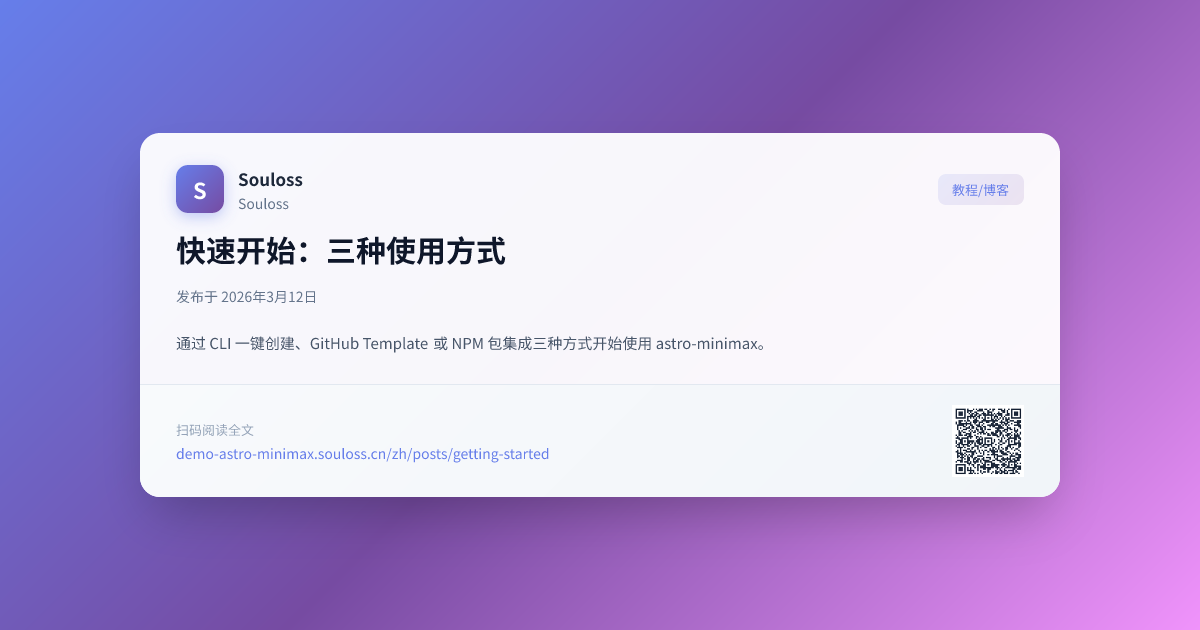
Dynamic OG images in astro-minimax include the blog post title, author name, and site title. Author name and site title are sourced from SITE.author and SITE.title in src/config.ts, while the title comes from the post frontmatter title.
Issue Non-Latin Characters
Titles with non-latin characters won’t display properly out of the box. To resolve this, we have to replace fontsConfig inside loadGoogleFont.ts with your preferred font.
async function loadGoogleFonts(
  text: string
): Promise<
  Array<{ name: string; data: ArrayBuffer; weight: number; style: string }>
> {
  const fontsConfig = [
    {
      name: "Noto Sans JP",
      font: "Noto+Sans+JP",
      weight: 400,
      style: "normal",
    },
    {
      name: "Noto Sans JP",
      font: "Noto+Sans+JP:wght@700",
      weight: 700,
      style: "normal",
    },
    { name: "Noto Sans", font: "Noto+Sans", weight: 400, style: "normal" },
    {
      name: "Noto Sans",
      font: "Noto+Sans:wght@700",
      weight: 700,
      style: "normal",
    },
  ];
  // ...
}Trade-off
While this is a nice feature to have, there’s a trade-off. Each OG image takes roughly one second to generate. This might not be noticeable at first, but as the number of blog posts grows, you might want to disable this feature. Since every OG image takes time to generate, having many of them will increase the build time linearly.
For example: If one OG image takes one second to generate, then 60 images will take around one minute, and 600 images will take approximately 10 minutes. This can significantly impact build times as your content scales.
Limitations
The current build-time OG pipeline still comes with a few practical limitations.
- Build time increases roughly linearly with the number of posts that need generated OG images.
- Font coverage and special-character rendering still depend on your configured font assets.
- If the build environment is missing the image rendering dependency, PNG output cannot be generated during build.
评论区
文明评论,共建和谐社区